Showing posts with label OpenGL. Show all posts

Thursday, 28 July 2011

Perspective Projections | OpenGL

Perspective Projections

1. The visual effect of the perspective projection is similar to the human visual system known as perspective foreshortening i.e. the size of perspective projection object varies inversely with the distance of the object from COP.


2. Perspective projection does not preserve parallel lines.


3. Vanishing Point
Any set of parallel lines that are not parallel to projection plan appear to converge to a point called vanishing point.


Perspective Projections

* In this case lines parallel to x and y do not converge, only lines parallel to z do so

One Point Perspective Projections
* One point perspective projection of a cube

Two Points Perspective Projections
* A two point perspective projection of a cube


Tuesday, 26 July 2011

Parallel Projections | OpenGL

Parallel Projections

In case of parallel projection instead of having COP we have direction of projection (DOP), so the perspective projection whose COP is at infinity becomes parallel projection.
In parallel projections, the lines projecting from an object onto the image plane are parallel.
Two parallel projection systems:
1. Orthographic projection
Parallel Projection

Orthographic Parallel Projection


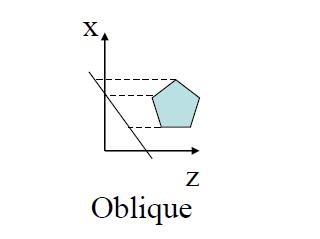
2. Oblique projection

In these the projection plane is normal and direction of projection differ.

Its major types are:
– Cabinet
– Cavalier


Oblique Parallel Projection


Monday, 18 July 2011

3D Coordinate Systems | OpenGL

1. Right hand coordinate system

3D Coordinate Systems


2. Left hand coordinate system(
Not used in OpenGL)


3D Coordinate Systems


Wednesday, 27 April 2011

OpenGL States

On/off (e.g., depth buffer test)
  1. glEnable( GLenum )
  2. glDisable( GLenum )
  3. Examples:
  4. glEnable(GL_DEPTH_TEST);
  5. glDisable(GL_LIGHTING);
Mode States
  1. Once the mode is set the effect stays until reset
     Examples:
    glShadeModel(GL_FLAT) or glShadeModel(GL_SMOOTH)
    glLightModel(…) etc.

OpenGL Primitives

Drawing two lines
glBegin(GL_LINES);
    glVertex3f(_,_,_); // start point of line 1
    glVertex3f(_,_,_); // end point of line 1
    glVertex3f(_,_,_); // start point of line 2
    glVertex3f(_,_,_); // end point of line 2
glEnd();
We can replace GL_LINES with GL_POINTS, GL_LINELOOP, GL_POLYGON etc.

OpenGL Syntax

All functions have the form: gl*
1-glVertex3f() – 3 means that this function take three arguments, and f means that the type of those arguments is float.
2-glVertex2i() – 2 means that this function take two arguments, and i means that the type of those arguments is integer.
All variable types have the form: GL*
1-In OpenGL program it is better to use OpenGL variable types (portability)
2-GLfloat instead of float
3-Glint instead of int

OpenGL Order of Operations

Construct shapes 
1-Vertices
2-Edges
3-Polygons
Use OpenGL to:
1-Arrange shape in 3D (using transformations)
2-Select your vantage point (and perhaps lights)
3-Calculate color and texture properties of each object
4-Convert shapes into pixels on screen

Overview of an OpenGL Program

Main
1-Open window and configure frame buffer (using GLUT for example).
2-Initialize GL states and display (Double buffer, color mode, etc.).
Loop
1-Check for events
    a)if window event (resize, unhide, maximize etc.)
    b)modify the viewport and Redraw
    c)else if input event (keyboard and mouse etc.)
    d)handle the event (such as move the camera or change the state) and usually draw the scene
Redraw
1-Clear the screen (and buffers e.g., z-buffer)
2-Change states (if desired)
3-Render
4-Swap buffers (if double buffer)

OpenGL

A high-performance, window-system independent, software interface to graphics hardware.
OpenGL


GLUT (Provides and easy access to the underlying windowing system – creating windows and looking for mouse and keyboard events etc.)
GLU (Provides helper routines built on top of OpenGL rendering capabilities)